





.png)
By Nick Newsom, Chief Customer Officer, SharpenCX
I’ve been building and running contact center technology for a long time. And I’ll say something that a lot of people in this industry won’t: your customers probably hate your AI. Not because AI is bad. Because most of the AI in contact centers right now was rolled out badly.
Years of slow, high-latency IVR systems and rigid call menus have trained customers to expect a dead end when they hear a bot. That’s tech trauma, and it’s a real thing. Consumer expectations are lagging indicators of every bad experience they’ve had before yours.
The factors that make AI suck are pretty consistent:
- High latency — that awkward silence after you speak that makes you think the call dropped
- Poor background noise handling
- No context — having to start from scratch every time, with every agent or bot, regardless of what you’ve already explained
The good news: the numbers have turned a corner. Companies doing it well are seeing it work. But getting there requires a plan. Here’s the one I’ve been using.
The “Don’t Suck” AI Rollout Plan
I call it the Don’t Suck plan. It’s not clever branding — it’s a practical sequence for standing up AI in a contact center without creating a worse experience than the one you had before.
Step 1: Measure Before You Build
Before you configure a single AI call flow, do a 30-day call audit. Pull the data from your existing recordings and figure out what’s actually happening in your contact center. Specifically:
30-Day Call Audit: What to Pull
- Resolution rates and repeat calls
- Top call intents and automation candidates
- IVR drop-off and misroutes
- Handle time and transfer patterns
- Common conversation flows and agent scripts
- Data required to resolve each call type
- Customer frustration and escalation triggers
This audit tells you what to automate first, where your current IVR is failing customers, and what data your AI will need to actually resolve a call rather than just navigate one. You can’t design a good AI flow from assumptions. You design it from call data.
Step 2: Design Around Context, Not Just Automation
Here’s a question worth asking honestly before you touch your CRM integration: is your AI building a pathway into your CRM, or building a wall to get to it?
A wall offers nothing to your customers. It’s just something they have to get around. The entire point of integrating AI with your CRM is to equip it with the context it needs — either to solve the request itself, or to pass that context to a human so they can solve it fast.
Design your AI implementation around that question: how can we give the AI as much context as possible? What does it need to know before the conversation starts? What does the agent need to know if the call escalates? If you can’t answer those questions, you’re not ready to build.
Step 3: Implement With Guardrails
Two things I recommend on every rollout, without exception:
Frustration detection. Set sentiment triggers that escalate immediately when a customer is struggling. Don’t make them ask for a human three times. If the AI detects they’re frustrated, get them to a person — with context — before they hang up.
An after-hours sandbox. Test your new AI flows when the stakes are lower — nights and weekends. You’ll surface edge cases and failure modes without the full consequences of daytime volume. Measure before and after, and be honest about the results.
On measurement: First Call Resolution is the metric that matters. Your AI should either resolve the call or quickly determine it can’t, then escalate with the context needed for a fast human resolution. The key question is always the same — is your AI actually using your data to provide service, or is it just a fancy wall?
Five Tips for Doing It Better
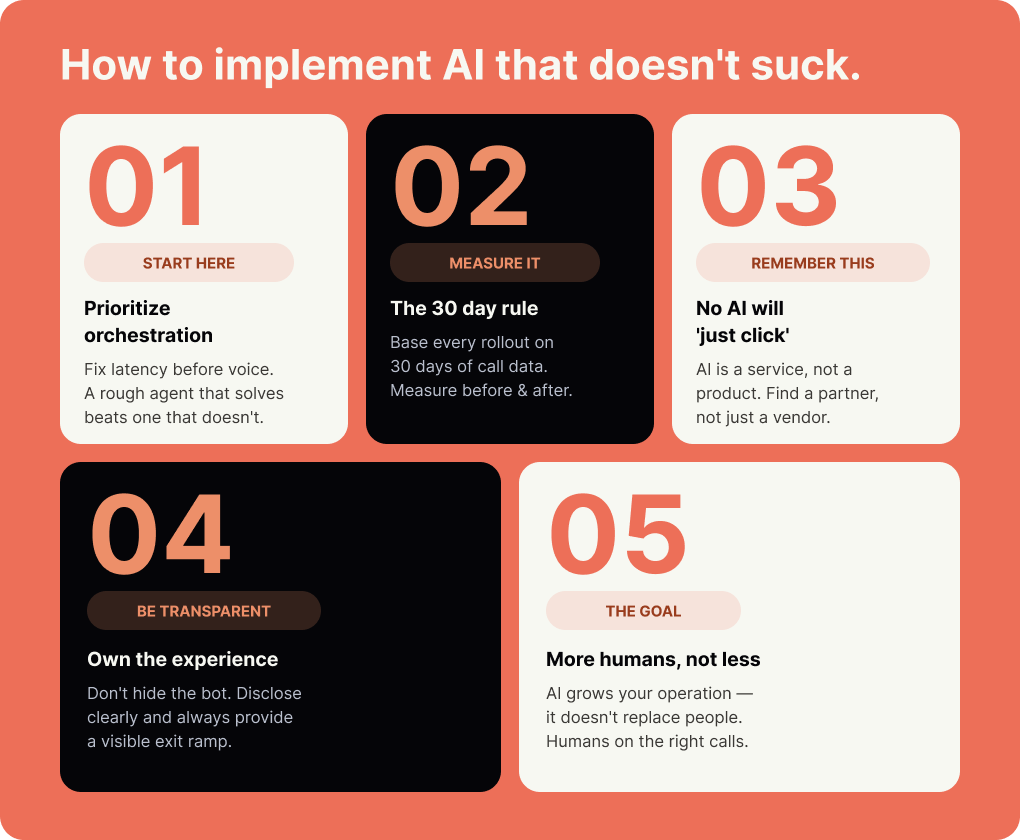
Beyond the three steps, here’s what separates contact centers that are getting results from the ones that are still frustrated:
Own the experience. Don’t hide the bot. Disclose it clearly and give customers a visible exit ramp to a human. Customers who know they’re talking to AI and can get out of it trust the interaction more than customers who feel trapped.
Prioritize orchestration over polish. A rough-sounding agent that solves the problem beats a polished one that doesn’t. Get the customer journey right first. Fix the latency before you fix the voice.
Use the 30-day rule consistently. Base each new rollout on 30 days of call data. Measure before and after every change. If the numbers don’t support continuing, don’t continue.
Treat AI like a service, not a product. There is no AI you can just switch on and expect results. The better the setup, the better the integration, the better the outcome. Find a provider who will work to understand your business — not just hand you a platform and walk away.
AI should mean more humans, not fewer. I genuinely believe AI is a tool to help contact centers grow and handle more volume — with humans on the calls that actually need them. That’s the intersection worth building toward. Get the AI doing what it’s good at, and free your people to do what they’re good at.
The Bottom Line
The technology works. The data is clear. But technology working and technology being deployed well are two different things — and most contact centers are still figuring out the second part.
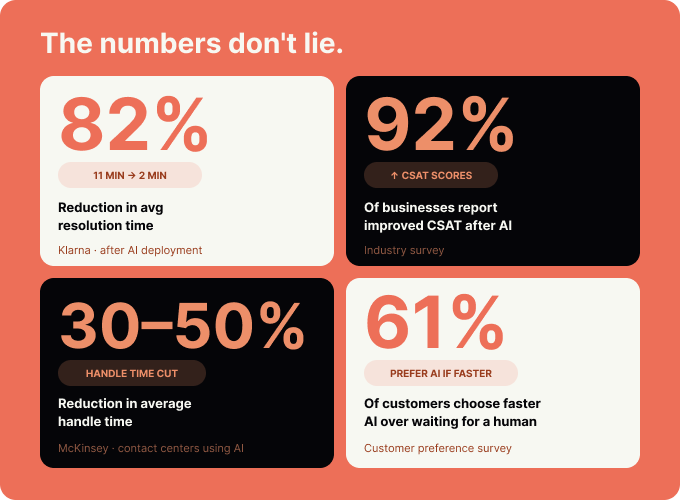
The Don’t Suck plan isn’t complicated. Audit before you build. Design around context. Implement with guardrails. Measure everything. The contact centers cutting resolution times by 80% and improving CSAT across the board aren’t doing anything magical — they’re just doing the fundamentals right.
Your customers want AI to work. Research consistently shows that 61% of customers will choose a faster AI response over waiting for a human — when it gets them to the same resolution. The bar is functional and fast. Start there.
Frequently Asked Questions
Why do customers dislike AI in contact centers?
Mostly because of past experience. Years of slow, rigid IVR systems have conditioned customers to expect that a bot means a dead end. High latency, poor noise handling, and having to repeat yourself every time you call are the specific friction points that drive frustration. When AI is fast, contextual, and has a clear path to a human when needed, customer response is very different.
What is the 30-day call audit and why does it matter?
A 30-day call audit means analyzing a month of call recordings to understand what customers actually call about, where your current IVR fails them, what data resolves their issues, and where frustration and escalation patterns occur. This baseline is what good AI design is built on. Without it, you’re configuring call flows based on assumptions rather than evidence.
What does “designing around context” mean in practice?
It means your AI implementation is built to gather and pass information — not just to navigate callers through a menu. The practical test: if a call escalates to a human agent, does that agent receive the full context of the AI interaction, or do they start from scratch? If they’re starting from scratch, your AI is a wall, not a tool. The integration with your CRM should be designed to eliminate that restart.
How do you know if your AI rollout is actually working?
First Call Resolution is the metric that matters most. If your AI is resolving calls — or quickly handing off to humans who can — FCR will reflect it. Pair that with callback rate, CSAT, and containment rate. Measure before and after every change. If the numbers aren’t moving in the right direction after a 30-day post-launch window, something in the setup needs to change.
What does “AI should mean more humans, not fewer” mean?
It means AI should absorb the routine volume — payments, balance inquiries, appointment confirmations, FAQs — so that human agents are available for the interactions that actually require judgment, empathy, or complexity. The goal isn’t fewer people. It’s people on the right calls. That’s where AI and human support intersect in a way that improves both customer experience and operational efficiency.
Sources
- Klarna case study: resolution time reduction from 11 minutes to 2 minutes (82%). Klarna, 2024.
- 92% of businesses report improved CSAT after implementing AI. Lorikeet CX / industry aggregated data, 2025–2026.
- 30–50% reduction in average handle time. McKinsey GenAI productivity research, 2024–2025.
- 61% of customers choose faster AI responses over waiting for a human agent. Masterofcode / Forrester-cited industry data, 2024.